How to check the RTP of slots with the Push Gaming provider



Push Gaming is a slot provider known for games such as Razor Returns, Wild Swarm, Jammin’ Jars, Big Bamboo, Retro Tapes, and other feature-heavy titles. Many of its slots are built around volatile bonus rounds, mystery symbols, multipliers, or collector mechanics, so it is easy to focus on the feature sheet and forget the basic math.

With Push Gaming, checking the RTP is especially important. Push Gaming’s own game pages for several titles state that RTPs may vary per casino and that the RTP can be found in the user panel and on the game loading screen. Examples include Razor Returns, Wild Swarm, Retro Tapes, Bait ’n’ Bank, and other Push Gaming titles where two RTP figures are shown on the provider’s site.

Quick Answer
To check the RTP of a Push Gaming slot, open the game, go to the menu in the top-right corner, tap the information button marked with a question mark, and scroll through the help or rules pages until you reach the additional game information area. In many Push Gaming games, the RTP appears near the standard rules text, often close to wording such as “Malfunction voids all pays and plays.”
Push Gaming’s official site also says the RTP can be shown in the user panel and on the loading screen, but the exact layout may depend on the casino, device, game version, and market.
How to Check RTP in Push Gaming Slots Step by Step
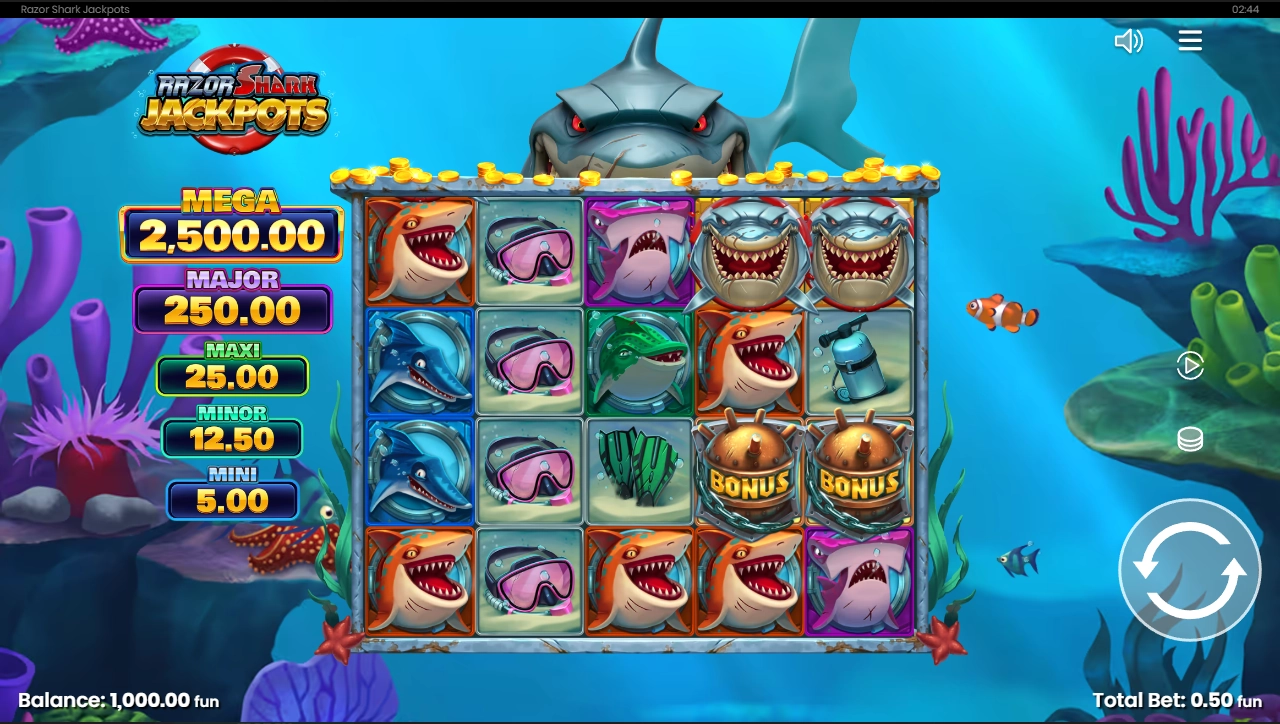
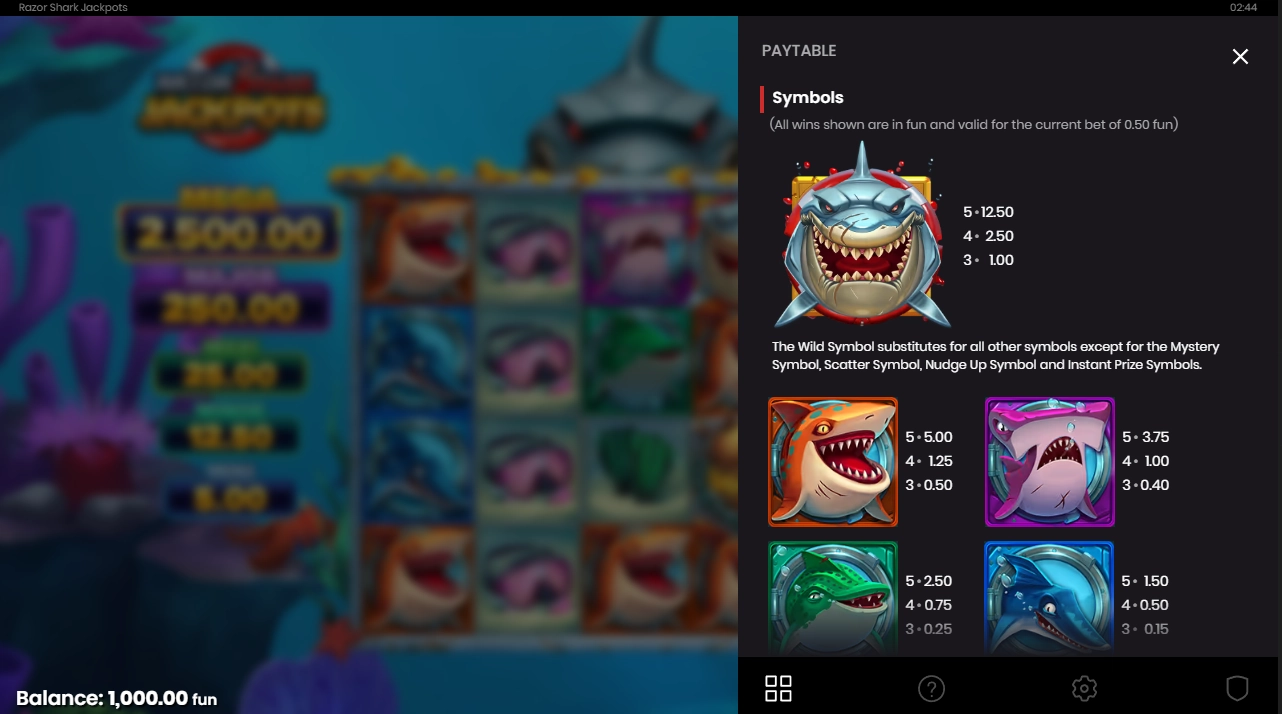
On Desktop
- Open the casino’s slot lobby and choose the Push Gaming game you want to check.
- Launch the slot by pressing the play or start button.
- Wait for the game to load fully. Do not rely only on the casino lobby number, because the in-game screen is the better place to confirm the active version.
- Look at the top-right corner of the game screen.
- Open the game menu.
- Tap the information button, usually shown with a “?” icon.
- Scroll through the paytable, rules, and help pages.
- Look for sections such as “Additional Information,” “Game Rules,” “RTP,” “Return to Player,” or the rule text near “Malfunction voids all pays and plays.”
- Write down or remember the RTP shown inside the game.
- Compare it with the RTP shown on Push Gaming’s own game page or in your casino’s game information, if those are available.
The key detail is that you are not just looking for the symbol payouts. Push Gaming help screens can include a lot of information about bonus features, buy features, volatility, autoplay, and malfunctions. Keep scrolling until you reach the general information area where RTP is usually listed.
On Mobile
The process is almost the same on mobile, but the buttons may be smaller or hidden behind a compact menu.
- Open the Push Gaming slot from your casino app or mobile browser.
- Let the game load in portrait or landscape mode, depending on how the casino displays it.
- Find the menu button, normally near the top-right corner.
- Tap the “?” or information icon.
- Swipe through the help pages slowly.
- Check the lower part of the rules or additional information pages for the RTP.
- If the screen is cramped, rotate your phone or expand the game view if the casino allows it.
Mobile layouts can vary more than desktop layouts. Some casinos wrap the Push Gaming game inside their own interface, so the casino’s balance bar, responsible gambling tools, or lobby button may sit around the game frame. The Push Gaming info button should still be inside the game window itself.
What to Look for in the Game Info Screen
When you open the information section, look for three things.
First, find the exact RTP number. Do not stop at the game description or volatility label. “High volatility” tells you the game may have swingy results, but it does not tell you the long-term return percentage.
Second, check whether the wording says the RTP may vary. Push Gaming’s official pages for several games use this warning, so it should not be ignored.
Third, make sure you are checking the real game version at the casino where you may play. A provider website, review page, or demo page can be useful for comparison, but the number that matters most is the RTP shown in the actual game loaded inside that casino.
Can Push Gaming Slots Have Different RTP Versions?
Yes. This is confirmed by Push Gaming’s own game pages. Several Push Gaming titles list more than one RTP and state that RTPs may vary per casino. Razor Returns, for example, is shown with two RTP values on the provider page, and the same type of wording appears on other official Push Gaming game pages.
That does not mean a casino is secretly changing the math during your session. A fairer way to explain it is that some providers supply different certified versions of the same game, and operators may use different versions where local rules and supplier agreements allow it.
For players, the result is still important. Two casinos may offer the same Push Gaming title with the same name, same graphics, and same bonus features, but the return percentage may not match. That is why the in-game RTP check is not a technical detail. It is part of checking the game before you play.
A Push Gaming Example
Take Razor Returns as a practical example. Push Gaming’s official Razor Returns page states that RTPs may vary per casino and says the RTP can be found in the user panel and on the game loading screen. The page also shows more than one RTP figure for the game.
So if you open Razor Returns in a Canadian-facing casino, do not assume the highest number from a review page or provider page is the version you are seeing. Open the game, go into the info menu, and confirm the active RTP there. If the casino’s version shows a lower number than expected, you at least know that before you decide whether to continue.
The same logic applies to other Push Gaming titles where the provider page says RTPs may vary per casino, such as Wild Swarm, Retro Tapes, Bait ’n’ Bank, and Red Hot Multipliers.
What If the RTP Is Not Shown?
If you cannot find the RTP inside a Push Gaming slot, do not guess.
First, check the loading screen again. Push Gaming says the RTP can be shown there, and some players miss it because the game loads quickly.
Second, reopen the game menu and scroll all the way through the information pages. The RTP may be placed below the paytable, below bonus rules, or near standard wording about malfunctions and unfinished game rounds.
Third, check the casino’s game information panel outside the slot. Some casinos display RTP in the lobby, game tile, or “more info” window. Treat that as helpful, but still compare it with the in-game number when possible.
Fourth, contact support and ask for the exact RTP version of that specific Push Gaming title. Name the game clearly. Do not ask only, “What is the RTP of your slots?” Ask, for example, “What RTP version of Razor Returns is running in this casino?”
If support cannot answer and the game itself does not show the RTP, that is a bad sign for transparency. It does not automatically prove anything illegal, but regular players should not have to hunt for such basic information. In that situation, the safer choice is to skip that game or use a casino that shows RTP clearly before you play.
Is the RTP Always Visible Before Launching the Game?
Not always. Push Gaming’s official pages say the RTP can be found in the user panel and on the loading screen, but casino interfaces are not identical. Some casinos show RTP in the lobby before launch. Others only show it after the game opens. Some may bury it inside the help pages.
That means the most reliable habit is to open the slot in demo mode first, where available, and check the game rules before playing with real money. If demo mode is not available, open the real-money game but check the RTP before placing a bet.
Why Canadian Players Should Check Push Gaming RTP Every Time
Canadian players often move between different casino brands, provincial platforms, offshore sites, and mobile-first casinos. The same Push Gaming title can appear in more than one place, but that does not guarantee the same RTP version.
This matters even if you already know the game. Maybe you played Big Bamboo or Jammin’ Jars elsewhere and remember the usual number from a review. That does not prove the active version in your current casino is identical. Push Gaming’s own wording makes clear that RTP may vary by casino on at least several titles.
The best habit is boring but useful: check the RTP every time you open a Push Gaming slot, especially if you are playing at a new casino, returning after a long break, or trying a game after a provider or casino update.
Practical Checklist Before Playing a Push Gaming Slot
Before you spin, run through this quick checklist:
- Have you opened the game’s own information menu?
- Have you found the RTP number inside the help or rules screen?
- Does the RTP match the version you expected?
- Does the game page or provider page say RTP may vary by casino?
- Are you checking the real-money version, not only a review or demo page?
- If the RTP is missing, did you check the loading screen and casino game info panel?
- If support cannot confirm the RTP, are you comfortable playing without knowing the exact return?
If the answer to the last question is no, stop there. There are enough casinos and slots available that you do not need to play a game where the basic RTP information is hidden or unclear.
Verdict
Push Gaming makes some memorable slots, but the RTP still needs to be checked like any other game detail. Open the slot, go to the info menu, scroll to the additional rules area, and confirm the active percentage before playing.
The name of the game is not enough. The casino, market, and version can matter. A few seconds in the help screen is better than playing a lower RTP version without realizing it.
Mike Collins is the creator of the CasinosInCanada project and a passionate iGaming analyst who writes guides, casino reviews, and investigations into unfair gambling practices.




FAQ
Open the slot, tap the menu in the top-right corner, choose the information button with the “?” icon, and scroll through the help or rules pages. The RTP may appear near “Additional Information,” “Game Rules,” or close to the standard line “Malfunction voids all pays and plays.” Push Gaming also says RTP can be found in the user panel and on the loading screen.
No, not always. Push Gaming’s official pages for several games state that RTPs may vary per casino. That means the same title can potentially have different RTP versions depending on where it is offered.
A casino does not normally change a slot’s RTP manually in the middle of play. The more accurate explanation is that different certified RTP versions may exist, and the operator may offer a lower or higher version where allowed. For Push Gaming, multiple RTP values are shown on several official game pages, so players should check the active version inside the game.
Check the loading screen, the in-game information menu, the casino’s game details panel, and then ask customer support for the exact RTP version. If the casino cannot show or confirm the RTP, it is reasonable to avoid that game and choose one where the return is clearly displayed.
Yes, especially with Push Gaming. Because the provider itself says RTPs may vary per casino on several titles, checking once is not enough. Recheck when you change casinos, switch from demo to real money, return after an update, or try the same game in a different market.