How to check the RTP of slots with the Nolimit City provider



NoLimit City, officially styled by the provider as Nolimit City, is a slot studio known for dark themes, unusual mechanics, and very high-volatility games such as San Quentin, Tombstone R.I.P., Mental, Deadwood, and Fire in the Hole. The studio is now part of Evolution, which completed its acquisition of Nolimit City in 2022.
RTP matters more with NoLimit City than with many simpler slot providers because these games can already be extremely swingy. A 96% RTP does not make a brutal slot “safe,” and a lower RTP version makes the same risky game less favourable before the first spin.
This is not just a theory. NoLimit City game sheets confirm multiple RTP setups for some titles. Tombstone R.I.P. is listed with 96.08% and 94.08% versions, while Fire in the Hole 2 lists 96.07%, 94.08%, and 92.07% RTP options.
If you want a fuller explanation of why reduced RTP matters, read this guide: Reduced RTP in Slots: Casino Manipulations Explained. For the basic meaning of RTP itself, start here: What Is RTP in Slots?.
With NoLimit City, it is worth checking the RTP every time you open a game, even if you played that same title before. The active number can depend on the game, casino setup, market, or later updates. Spending a few seconds in the rules screen is better than unknowingly playing a worse version and giving up part of your theoretical return before the round even starts.Quick Answer
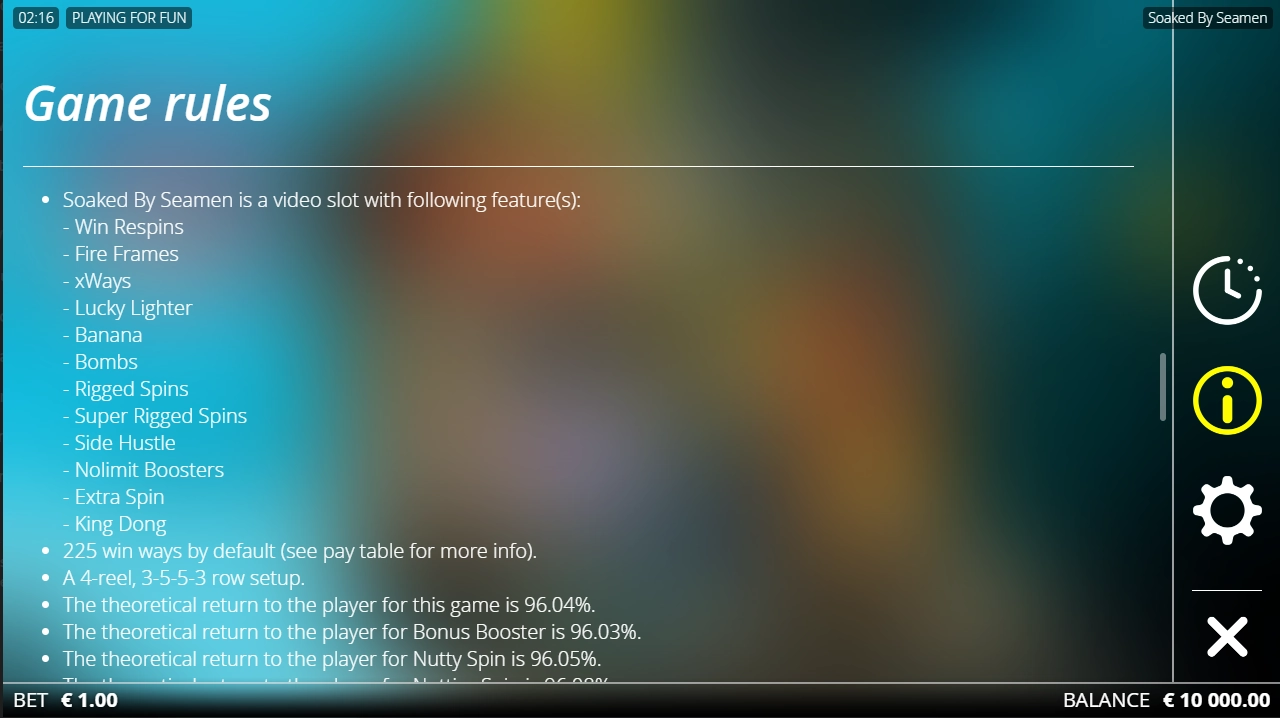
To check the RTP of a NoLimit City slot, launch the game, open the menu on the left side of the screen, then scroll through the rules or help section until you reach the “Game Rules,” “Game Information,” “RTP,” or “Total RTP” area.
On many NoLimit City games, the menu icon looks like three lines, three dots, or a small side-menu button. The exact layout can vary slightly between casino sites and mobile/desktop versions, but the RTP is usually inside the in-game rules screen, not always visible in the casino lobby.
How to Check RTP in NoLimit City Slots: Step by Step
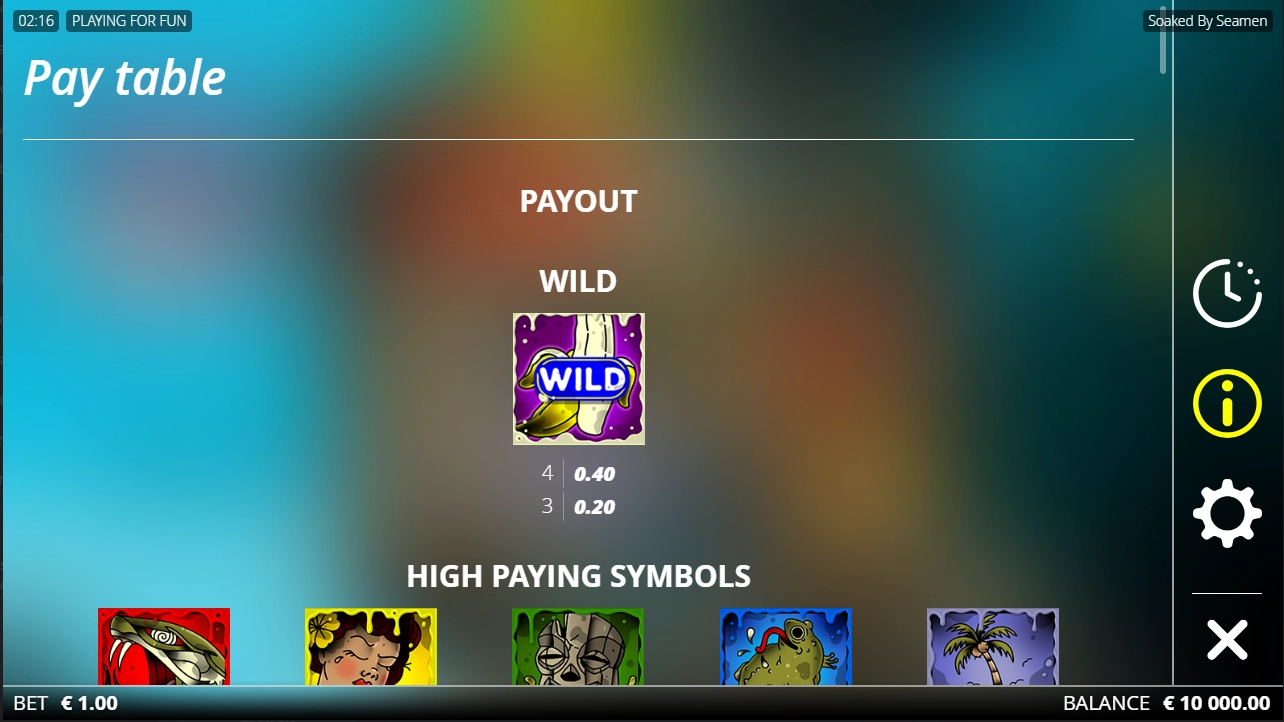
On Desktop
- Choose the NoLimit City slot in the casino lobby.
Do not rely only on the lobby tile. Some casinos show RTP there, but many do not. - Launch the game.
You usually need to press the play/start button before the full NoLimit City game interface loads. - Find the menu button on the left side of the game screen.
It is often shown as three horizontal lines, three dots, or a compact menu icon. - Open the menu and look for the rules/help area.
Depending on the casino skin, it may be called “Rules,” “Game Rules,” “Help,” “Info,” or “Paytable.” - Scroll down.
NoLimit City rules screens can be long because these games often have several bonus modes, xMechanics, feature buys, or special bet options. - Look for “RTP,” “Total RTP,” or “Return to Player.”
The number should be shown as a percentage. If the game has several bet modes, check whether the screen lists separate RTP values for the base game, bonus mode, xBet, enhanced bet, or feature buy. - Compare the value with the known standard version when possible.
If you see a much lower version, such as a 94%, 92%, or lower setup on a game that is commonly available around 96%, treat that as an important warning sign.
On Mobile
- Open the slot and rotate your phone only if the game asks you to.
- Tap the menu icon, usually placed on the left side or in a corner of the game frame.
- Open the rules, info, or paytable section.
- Scroll carefully, because mobile rules screens often hide RTP far below the feature descriptions.
- Check the exact percentage before you decide whether to continue.
On mobile, the RTP is easy to miss because the menu is more compressed. Do not stop at the symbol paytable. Keep scrolling until you reach the rules or mathematical information.
What to Look For in the NoLimit City Info Screen
The main number you want is Total RTP. This is the headline long-term theoretical return of the version running in that casino.
NoLimit City game information may also show extra details, including:
- RTP Options — a sign that more than one certified setup exists.
- Base Game RTP / Bonus Mode RTP — useful, but not the same as the total RTP.
- xBet or Enhanced Bet RTP — some NoLimit City games change the cost and maths when you activate extra bet features.
- Bonus Buy or Feature Buy details — these may have their own conditions and may be unavailable in some regulated markets.
- Volatility rating — many NoLimit City games are high, extreme, or even “insane” volatility, which means results can be very uneven.
- Max win probability and free spin frequency — helpful for understanding how rare the biggest outcomes are.
For example, the official Tombstone R.I.P. sheet shows different RTP values for the regular setup and the Enhanced Bet setup, while also showing the game’s “Insane” volatility rating and very rare max win probability.
Can NoLimit City Slots Have Different RTP Versions?
Yes, for many NoLimit City slots, different RTP versions are confirmed.
This is not something players should guess about. NoLimit City’s own game sheets show multiple RTP options and different game IDs for certain titles. Jingle Balls, for example, lists standard, DX1, DX2, and DX4 versions with different RTP values, with the DX4 version marked for the German market.
That does not mean every casino is “cheating” or changing the game secretly. In regulated online gambling, providers can supply different certified versions, and casinos may run the version allowed by their licence, market rules, and commercial setup. The problem for players is simple: the lower version can look and feel like the same slot.
For NoLimit City, this matters because the games are already volatile. Dropping from a standard version to a lower RTP version does not change every spin in a way you can see, but it changes the long-term maths behind the game. If you find a lower RTP version and the casino makes that information hard to find, the practical move is to stop and choose a clearer, better-disclosed option elsewhere.
Example: Checking a Real NoLimit City Game
Take Fire in the Hole 2 as a real example. The official game sheet lists several RTP options: 96.07%, 94.08%, and 92.07%. It also shows separate RTP contribution from the base game and bonus modes.
So, if you open Fire in the Hole 2 in a casino, do not assume the game is automatically running the highest version. Open the menu, go to the rules, scroll to the RTP section, and check the actual number shown there.
If the screen says 96.07%, you are seeing the higher listed setup from that sheet. If it says 94.08% or 92.07%, you are looking at a reduced version. The game theme, reels, sounds, and features may still look familiar, but the theoretical return is not the same.
What If the RTP Is Not Shown?
If you cannot find the RTP, do not guess.
Try this first:
- Reopen the rules screen and scroll all the way down.
- Check every tab in the help section, especially “Game Rules,” “Game Information,” and “Paytable.”
- Try the desktop version if mobile is too cramped.
- Look for a small “i,” question mark, three-line menu, or three-dot menu inside the game frame.
- Contact casino support and ask: “What is the RTP version of this NoLimit City slot?”
If support cannot answer, or if the game rules do not show the RTP at all, the safest decision is not to play that slot there. A licensed casino should make basic game information easy to check. When the RTP is hidden, unclear, or different from what the player reasonably expected, you cannot properly judge the game before playing.
Is the RTP Always Visible Before Launching the Game?
Not always.
Some casino lobbies display RTP on the game tile or in a separate info panel. Others only show it after the slot has fully loaded. With NoLimit City, you should expect to check inside the game itself, because the in-game rules screen is usually the most reliable place to confirm the active version.
The official NoLimit City website also shows RTP on individual game pages for many titles, such as The Crypt at 96.05%, Supersized at 96.07%, and xWays Hoarder 2 at 96.14%. Those official pages are useful references, but the number that matters in a real-money casino is the one displayed in that casino’s loaded game.
Practical Final Checklist
Before playing a NoLimit City slot, check these points:
- Did you open the in-game menu, not just the casino lobby tile?
- Did you scroll to the “Game Rules” or “Game Information” section?
- Did you find the actual RTP percentage?
- Does the game show more than one RTP, xBet, enhanced bet, or bonus mode value?
- Is the RTP close to the standard version, or clearly reduced?
- If the RTP is missing, did support give a clear answer?
- Are you comfortable with the game’s volatility as well as its RTP?
If any of these answers are unclear, pause. NoLimit City slots are not the kind of games where you want to play blind.
Verdict
Checking the RTP of NoLimit City slots is simple, but it is not optional if you care about the game’s real conditions. Launch the slot, open the side menu, go into the rules, and find the total RTP before playing.
For this provider, the difference between versions can be meaningful. If the RTP is reduced, hidden, or hard to confirm, treat that as a reason to step back rather than guess.
Mike Collins is the creator of the CasinosInCanada project and a passionate iGaming analyst who writes guides, casino reviews, and investigations into unfair gambling practices.




FAQ
Open the slot, tap the menu button on the left side of the game screen, then go to the rules, help, info, or paytable section. Scroll until you find “RTP,” “Total RTP,” or “Return to Player.”
No, not always. NoLimit City game sheets confirm that some games exist in multiple RTP versions, so the same title may have a different RTP depending on the casino, market, or game setup.
A casino cannot simply change the maths of a certified slot on its own whenever it wants. However, some NoLimit City games are supplied in different certified RTP versions, and the active version can depend on the operator setup and local rules.
Do not assume it is the best version. Check all rules tabs, try desktop if mobile is unclear, and ask support for the exact RTP version. If the casino cannot give a clear answer, choose another game or another casino.
Yes, especially with NoLimit City. Their catalogue includes games with confirmed multiple RTP versions, and updates or operator settings can change what version you are actually playing.
No. RTP is a long-term theoretical percentage, not a prediction for your session. This is especially important with NoLimit City because many of their slots are high or extreme volatility, so short-term results can be rough even on the higher RTP version.