How to check the RTP of slots with the QuickSpin provider



Quickspin is a Swedish game studio known for polished video slots such as Big Bad Wolf, Sakura Fortune, Mine & Melt, Wild Beans, and Golden Glyph. The company says it was founded in Stockholm in 2011 and was acquired by Playtech in 2016.
RTP matters because it tells you the theoretical long-term return of a slot. It does not predict what will happen in one session, but it does help you spot whether you are playing a stronger or weaker version of the same game.
For Quickspin, checking RTP is especially important. Several official Quickspin game pages confirm that some titles are released in multiple RTP versions. Wild Beans, for example, is listed with 96%, 94%, 92%, and 84% versions, while Sakura Fortune Epic Bloom is listed with 96%, 94%, 92%, and 87% versions.
For a general explanation of how RTP works, read this guide: What is RTP in slots?.
For more detail on reduced RTP versions and why players should care, read: Reduced RTP in Slots – Casinos’ Manipulations Explained.
Quick Answer
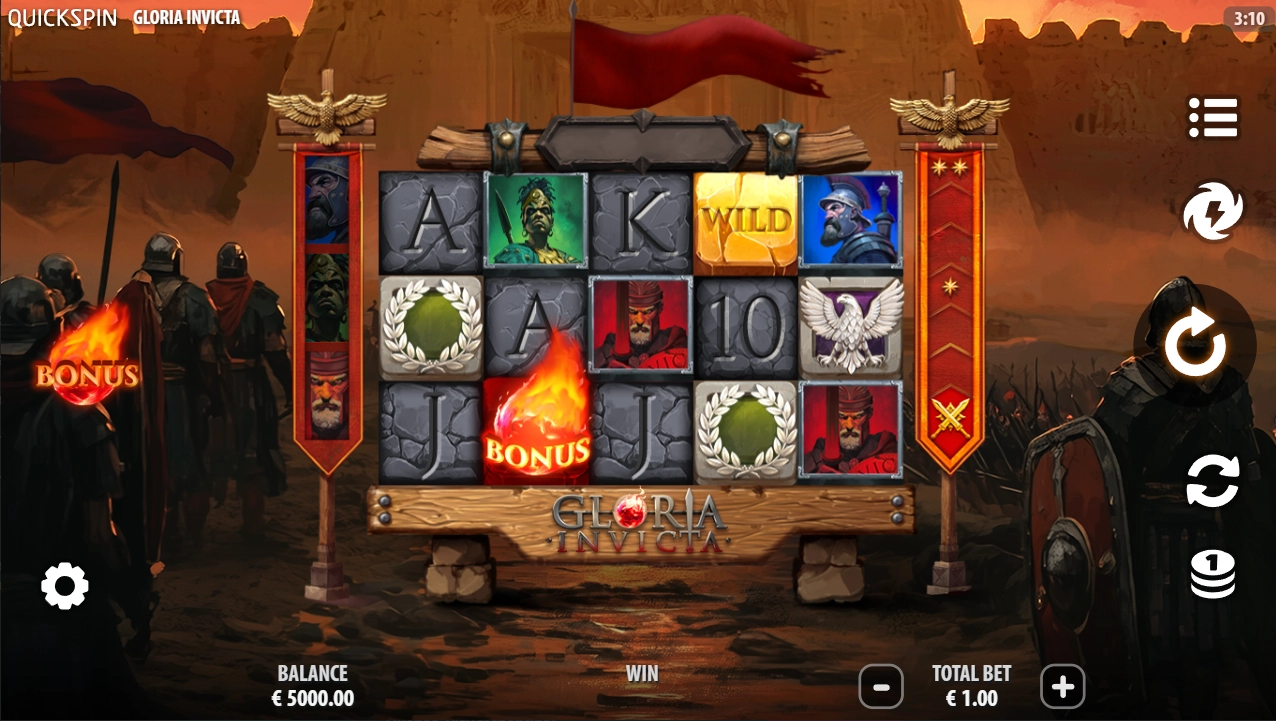
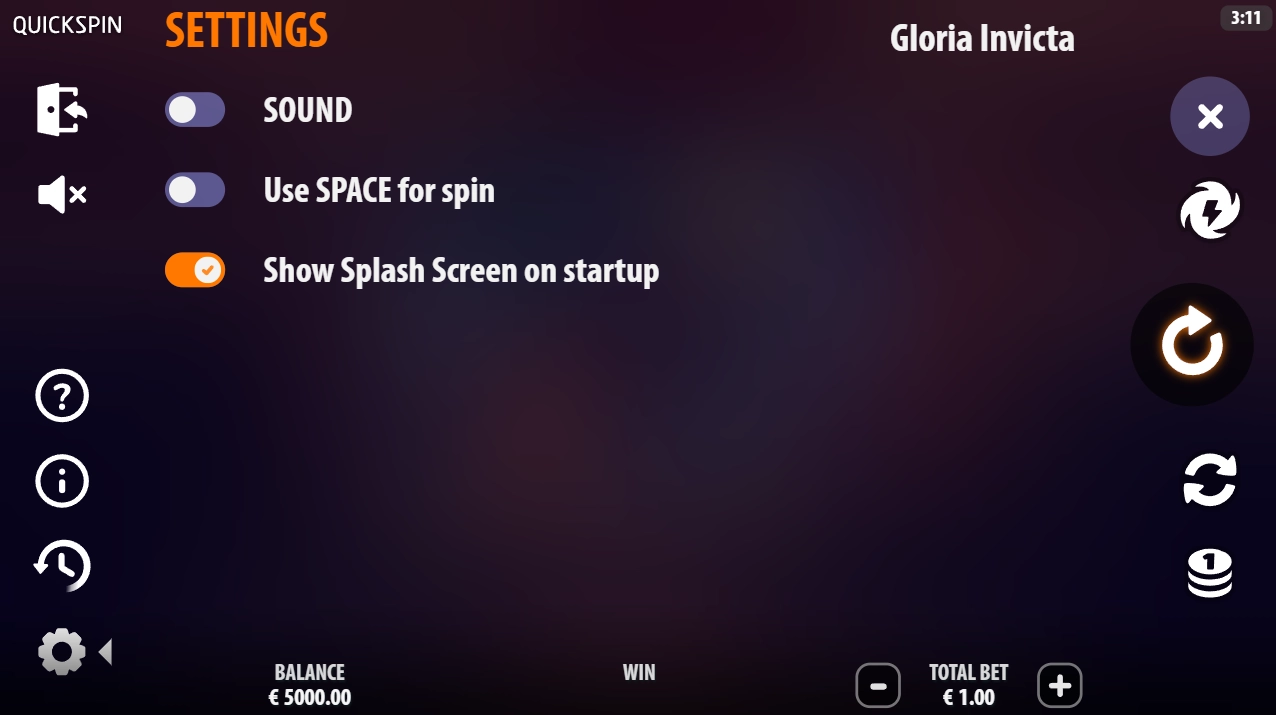
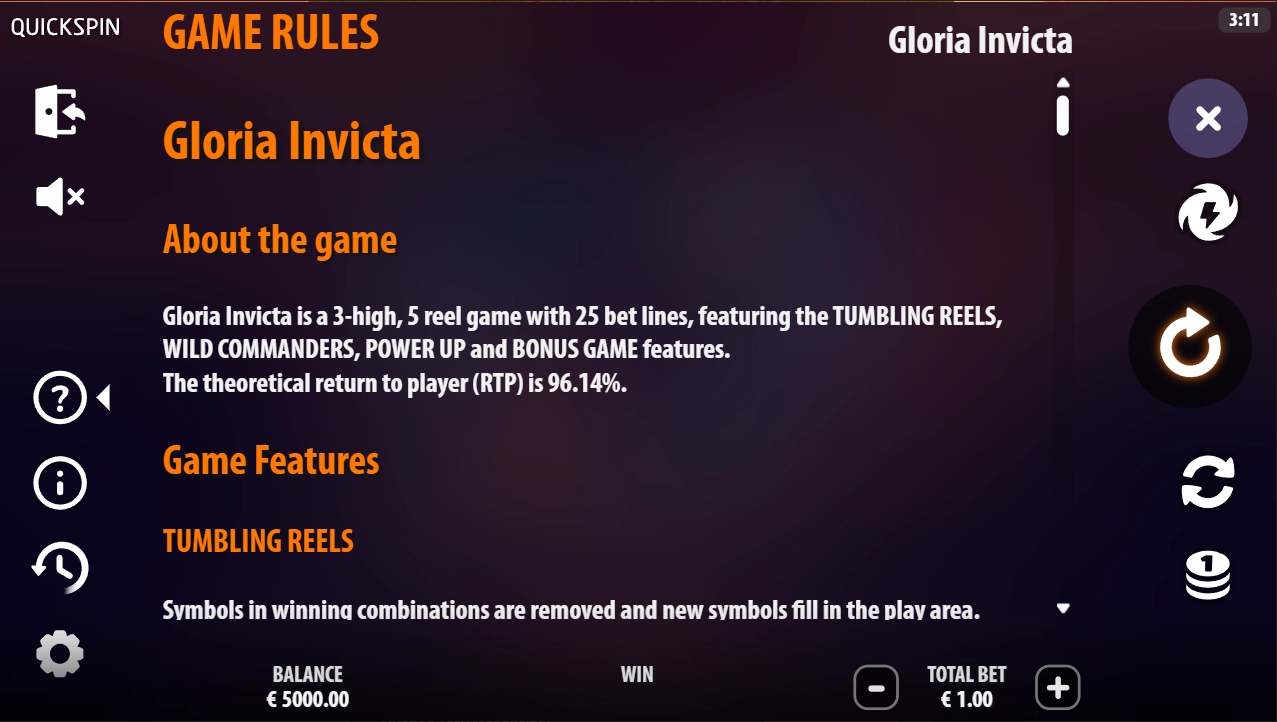
To check the RTP of a Quickspin slot, open the game, tap the gear icon on the left side of the screen, then choose the information section marked with a “?” symbol. In the Game Rules or About the Game section, look for “RTP,” “Return to Player,” or “Theoretical RTP.”
The exact layout can vary slightly by casino, device, and game version, but the RTP is usually inside the in-game help/rules area rather than on the main lobby tile.
How to Check RTP in Quickspin Slots Step by Step
On Desktop
- Open the casino and choose a Quickspin slot.
- Launch the game, but do not start spinning yet.
- Look for the gear icon, usually on the left side of the game screen.
- Click the gear icon to open the settings/menu panel.
- Select the information button marked with a “?” symbol.
- Open the Game Rules, About the Game, or Rules section.
- Scroll until you find “RTP,” “Return to Player,” or “Theoretical RTP.”
- Check the exact percentage shown in that casino.
On Mobile
- Open the Quickspin slot on your phone or tablet.
- Wait until the game fully loads.
- Tap the menu or gear icon. On smaller screens, it may be tucked into a side menu.
- Tap the “?” information button.
- Go into Game Rules or About the Game.
- Scroll carefully, because the RTP may sit below the feature rules, paytable, or legal text.
- Note the exact RTP shown before deciding whether to play.
The important part is not the icon itself. The important part is reaching the official in-game rules screen for that exact casino version.
What to Look For in the Game Rules
Do not stop at the paytable. A slot can show symbols, paylines, bonus features, and max win without showing the RTP on the same screen.
Look for:
- The exact RTP percentage, not just “high RTP” or “up to 96%.”
- Wording such as “Return to Player,” “RTP,” “Theoretical RTP,” or “theoretical payout.”
- Notes about Extra Bet, Buy Feature, or bonus purchases, because some features may not be available in every market. Quickspin’s own pages for games such as Mine & Melt and Sakura Fortune Epic Bloom state that Buy Feature availability can vary by market.
- Any difference between base game RTP and feature-buy RTP, if the game displays separate values.
Do not treat volatility, max win, or bonus frequency as a substitute for RTP. They describe different parts of the game.
Can Quickspin Slots Have Different RTP Versions?
Yes, for some Quickspin slots, multiple RTP versions are confirmed by Quickspin’s own game pages.
Wild Beans is listed with four RTP versions: 96%, 94%, 92%, and 84%. Sakura Fortune Epic Bloom is listed with 96%, 94%, 92%, and 87%. Golden Glyph 3 is listed with 96, 94, and 87 versions. Big Bad Wolf is listed with two RTP models: 90% and 97%.
That does not mean every Quickspin game has the same set of versions. It also does not prove that every casino can freely change the number whenever it wants. What it does show is simple: some Quickspin titles exist in more than one certified RTP model, so the only number that matters is the one displayed in the game you are actually opening.
For Canadian players, this matters because casino libraries can differ by province, licence, platform, and supplier setup. The same title name may not always mean the same RTP version.
Example: Why You Should Check Inside the Game
Take Wild Beans as a practical example. Quickspin’s official page says the game is available in 96%, 94%, 92%, and 84% RTP versions.
So if you see Wild Beans listed somewhere with 96%, that does not automatically mean your casino is running the 96% version. You need to launch the slot, open the gear menu, tap the “?” info button, and read the RTP inside the Game Rules screen.
That is the whole point of checking RTP manually: you are not relying on averages, old reviews, or another market’s version.
What If the RTP Is Not Shown?
If you cannot find the RTP inside a Quickspin game, do not guess.
Try this first:
- Check the Game Rules and About the Game sections again.
- Scroll to the bottom of the rules page.
- Check the casino’s game page, if it has one.
- Ask live chat or support for the exact RTP version of that slot.
- Compare the answer with the in-game rules if support gives you a number.
If the casino cannot show or confirm the RTP, it is better to skip that slot or choose another casino with clearer information. RTP is basic game information. A player should not have to dig through vague pages or trust a random number from a review site when the actual version can be different.
This is not about accusing a casino of cheating. It is about transparency. If the RTP is hidden, missing, or impossible to confirm, you do not know which version you are playing.
Is the RTP Always Visible Before Launching the Slot?
Not always.
Some casinos show RTP on the slot page before you open the game. Others only show it after the slot loads. With Quickspin, the safest method is to check inside the game rules after launch.
That can feel annoying, but it is the most reliable place because it should reflect the version actually installed by that casino.
Practical Checklist Before Playing a Quickspin Slot
Before you spin, check these points:
- Did you open the in-game rules, not just the casino lobby tile?
- Did you find the exact RTP percentage?
- Is the RTP close to the provider’s higher published version, or is it clearly lower?
- Does the game mention different rules for Extra Bet or Buy Feature?
- Is the RTP missing, vague, or hidden?
- Would you still choose this slot if the RTP is lower than expected?
If the answer feels unclear, stop there. Pick another slot or another casino where the information is easier to verify.
Verdict
Quickspin makes it fairly easy to check RTP once you know where to look: open the slot, tap the gear icon, choose the “?” info button, and read the Game Rules section.
The key is to check the real in-game number, not just a review, provider summary, or casino lobby label. Since several Quickspin games are confirmed to have multiple RTP versions, a quick check can tell you whether you are getting the better version or a reduced one.
Amanda Shimmer is the Chief Editor at CasinosInCanada and an experienced casino expert who ensures all guides, reviews, and industry investigations remain accurate, transparent, and helpful for players.




FAQ
Open the slot, tap the gear icon, choose the “?” information button, then go to Game Rules or About the Game. The RTP is usually listed there.
No, not necessarily. Quickspin’s own pages confirm that some titles are available in multiple RTP versions, so the number may vary by game, casino, market, or version.
Some Quickspin games are published in several RTP models. The public provider pages confirm the existence of multiple versions, but they do not show exactly how every operator chooses or receives those versions. The safe approach is to check the in-game RTP every time.
Check the full Game Rules section, then the casino’s slot page, then support. If the casino still cannot give you the exact RTP, avoid that game. You should not have to play without knowing the basic return figure.
Yes, especially with Quickspin titles that may have multiple versions. It only takes a moment, and it protects you from assuming you are playing a better version than the one actually loaded.
No. RTP is a long-term theoretical figure, not a promise for one session. A higher RTP only means the game is designed to return more over a very large number of spins compared with a lower-RTP version.